WORDPRESS PLUGIN DEVELOPMENT · UI / UX · INTEGRATIONS
Latitude 33 One way Flights
A custom flight-discovery plugin connecting available one-way flights with aircraft filters, destination browsing, and a clearer path to an inquiry.
- Client
- Latitude 33 Aviation Private aviation
- Project
- Custom one-way flight plugin Flight discovery and inquiry workflow
- My role
- Sole plugin developer Client requirements translated into technical solutions; independently coded in VS Code
- Timeline
- Approximately one month Late October–November 2026; launch planned for the week of November 16
- Status
- Launch planned New plugin experience scheduled to launch in November 2026
THE CHALLENGE
Turn flight availability into a useful browsing experience.
One-way flights connect a particular aircraft, route, and travel window. A useful interface needs to help visitors compare those details while making it easy to explore the places they want to go.
The project brings that experience into WordPress through a custom plugin. Visitors can start with an aircraft category, browse popular destinations, or search the flight feed by city. The same functionality can also appear on existing location pages, connecting editorial content with relevant flight opportunities.
I translated the client’s business requirements into the technical approach and independently coded the plugin in VS Code. Alongside the requested features, I added an email-to-popup enhancement connecting HubSpot emails with prefilled flight inquiries.
- Several clear ways to find a flight.
- One reusable flight interface across WordPress pages.
- Discovery connected to the inquiry workflow.
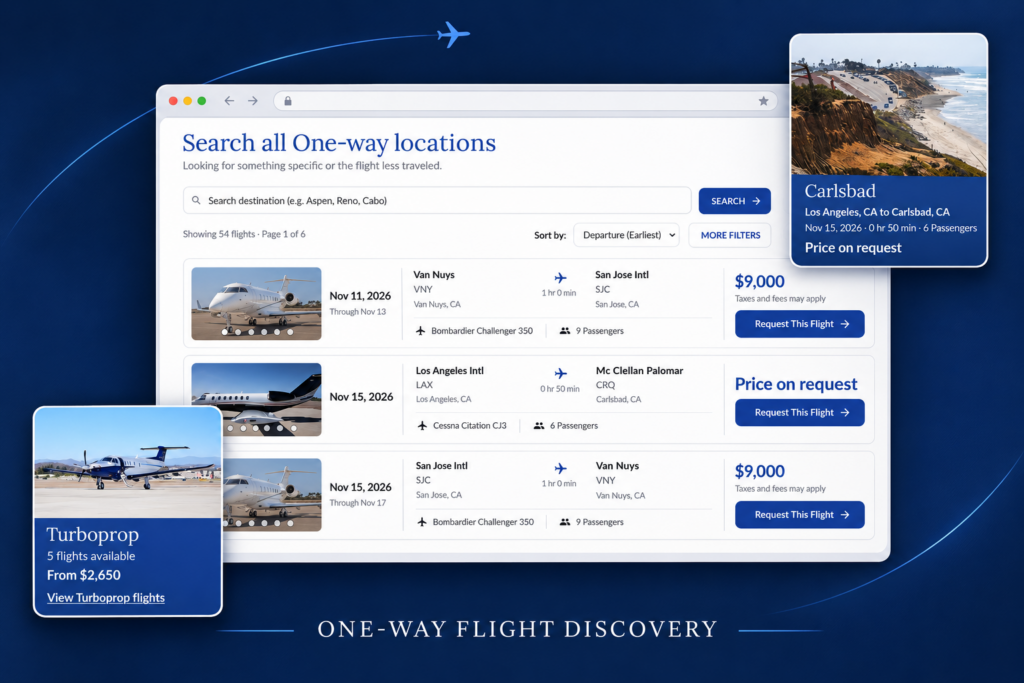
FEATURE 01 · AIRCRAFT FILTERS
Start with the aircraft that fits the trip.
Aircraft-category cards create a quick entry point into available flights. Visitors can choose Turboprop, Light Jet, Super-Midsize Jet, or Heavy Jet, then move into the matching results.
The cards surface availability and pricing information when present, helping visitors scan options before opening the full feed. A category with no current flights communicates that state directly.
- Visual category choices with flight-filter links.
- Availability counts and starting prices when supplied.
- A clear state when a category has no flights.
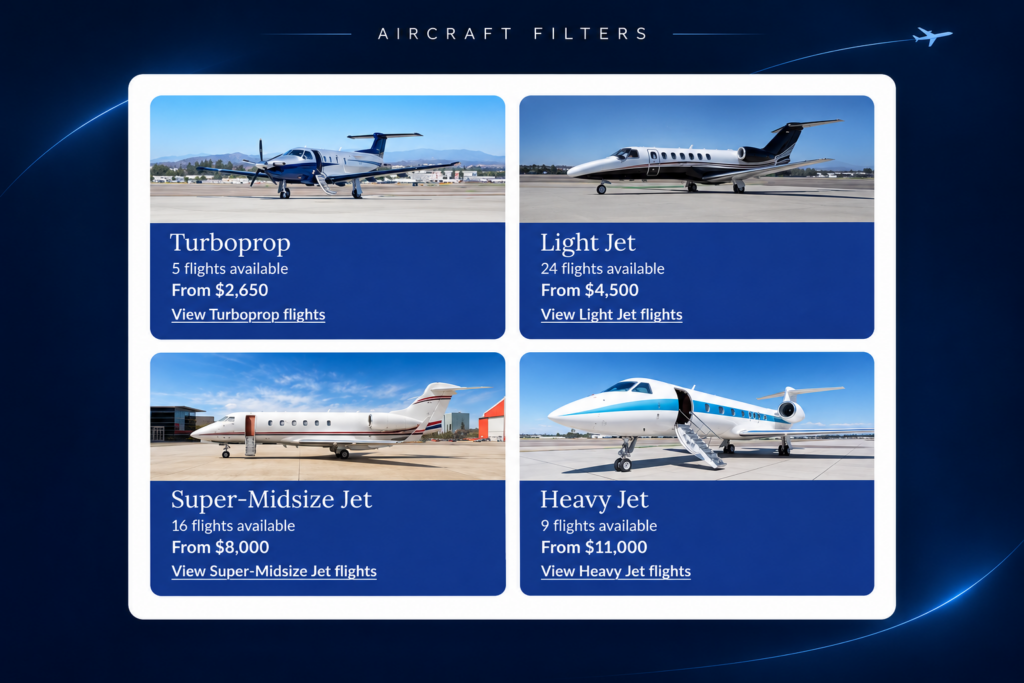
FEATURE 02 · DESTINATION DISCOVERY
Browse the destination before choosing the aircraft.
Epic Adventures offers another starting point: the places people want to visit. Destination cards combine location photography with a relevant flight opportunity and a link into destination-filtered results.
Someone interested in Carlsbad or Sun Valley can begin with the destination instead of navigating aircraft categories first. It is another route into the same inventory, organized around travel intent.
- Popular-location cards with destination imagery.
- Flight details alongside the destination.
- Links that narrow the feed to the selected location.
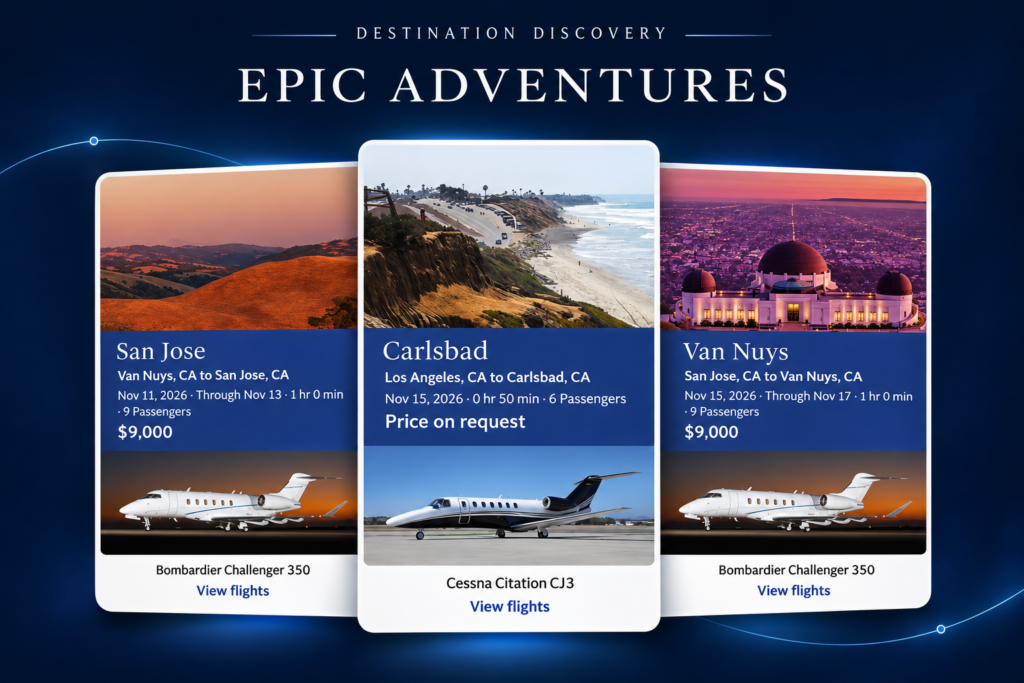
FEATURE 03 · SEASONAL CONTENT
A destination can look different with every season—and every visit.
Destination photography is managed as image sets rather than a single fixed picture. Date fields define when a seasonal set applies, while an image from the applicable set is selected on page load. The card can change between visits and reflect the time of year.
Editors can update imagery and seasonal windows without rebuilding the destination-card layout. A default image provides a fallback outside an applicable seasonal set.
- Editor-managed start and end dates.
- Image variation on page load within the applicable set.
- Default imagery for a consistent fallback.
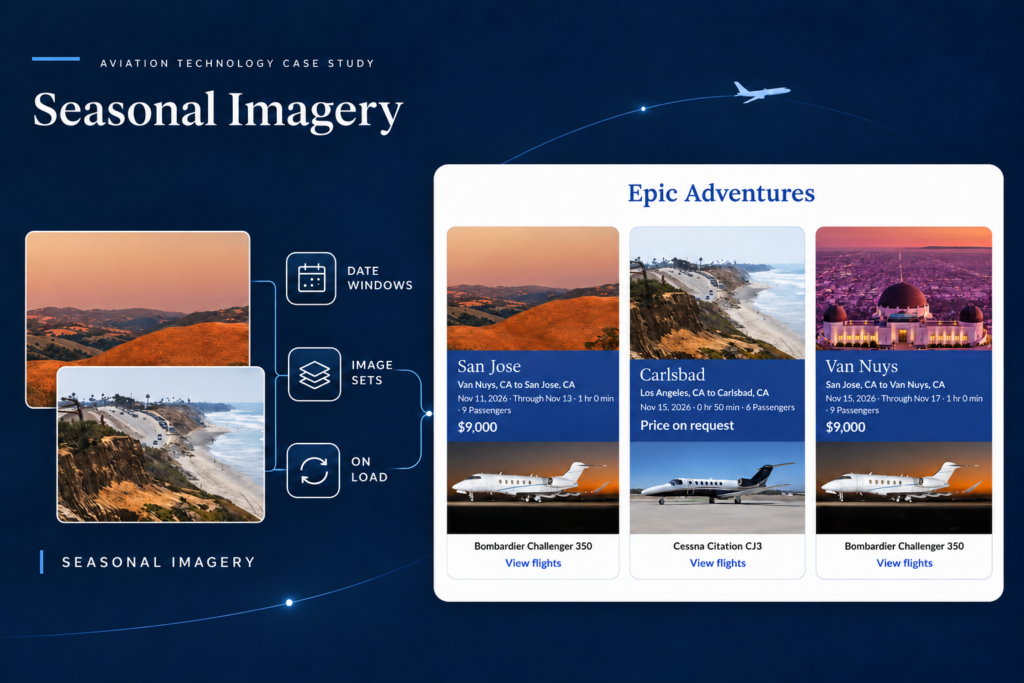
FEATURE 04 · FLIGHT RESULTS
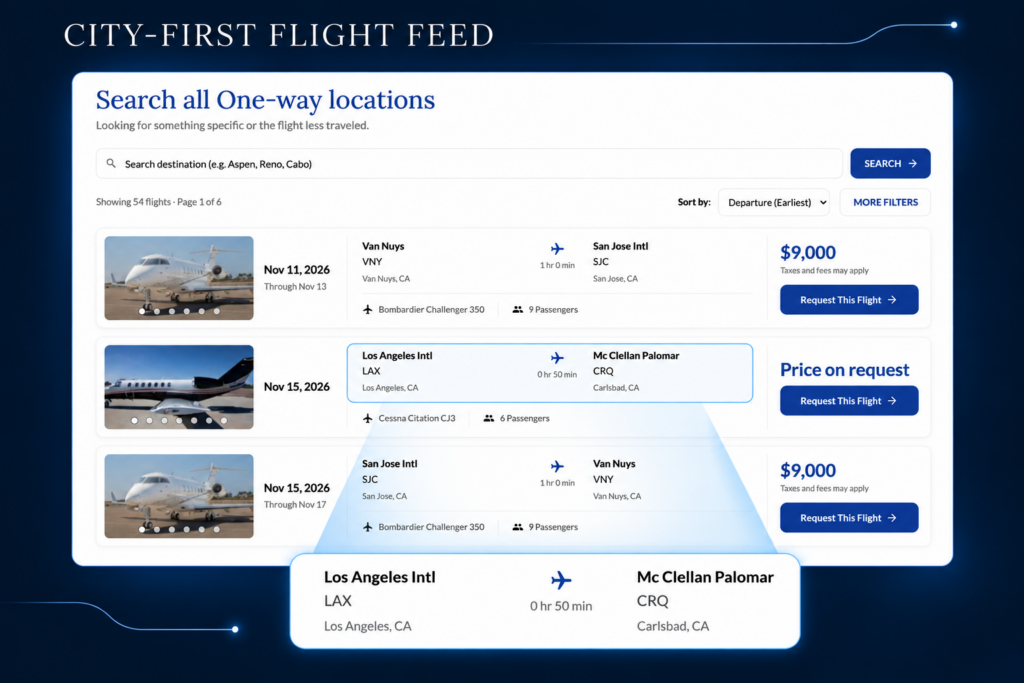
Put the route first.
The flight feed puts departure and arrival cities at the center of the browsing experience instead of making aircraft type the primary way to understand each opportunity. Visitors scan where a flight is going, then review aircraft and trip details in context.
Search and sorting support more focused browsing. Flight cards bring together the travel window, route, aircraft, passenger capacity, pricing when available, and a flight-specific request action. Aircraft photography remains accessible through the gallery.
- City and route details lead the presentation.
- Search, sorting, and filters narrow the results.
- Flight details, photography, and an inquiry action stay together.
Need custom functionality inside WordPress?
I connect interfaces, content, and integrations to support the way a business works.
FEATURE 05 · REUSABLE SHORTCODE
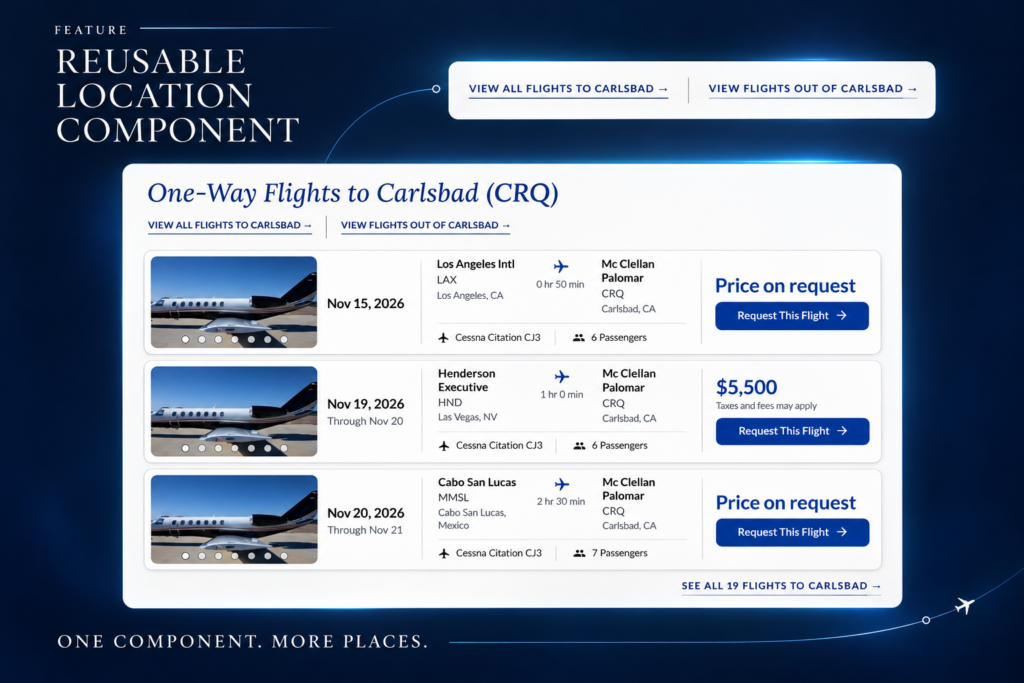
Bring flight opportunities to the pages visitors already read.
A reusable shortcode brings the flight component into existing location pages, such as the Carlsbad airport page. This connects destination information with flight discovery without requiring a separate custom template for every airport.
Editors can place the component where it supports existing content, while one shared implementation maintains a consistent flight interface.
- Reuse the component within existing WordPress content.
- Connect location information with flight discovery.
- Maintain one implementation across multiple placements.
FEATURE 06 · INQUIRY INTEGRATION
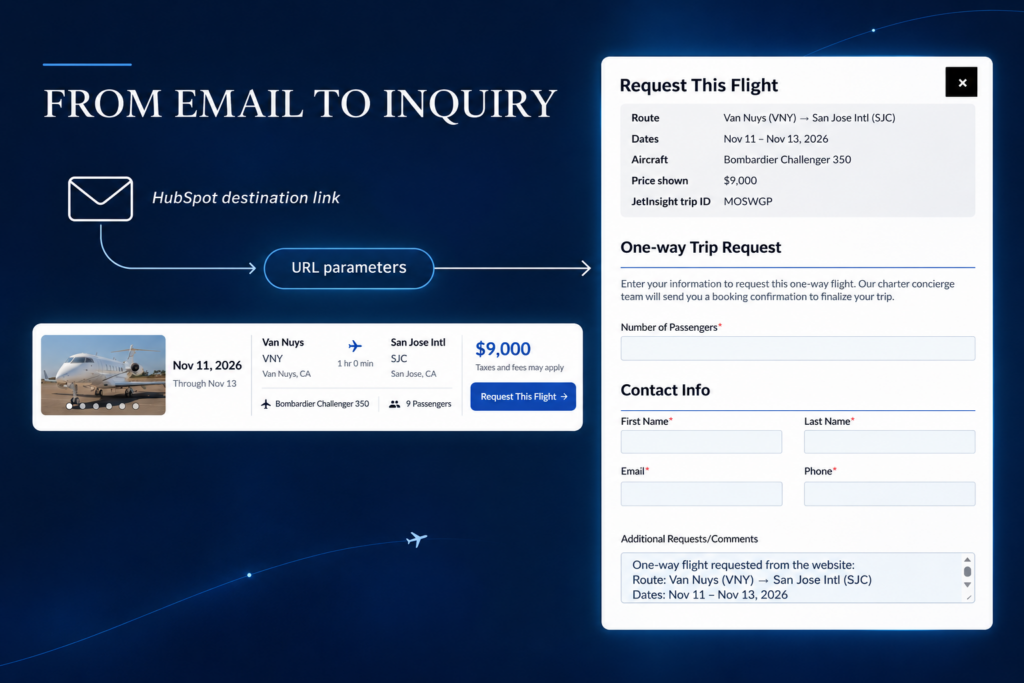
From a HubSpot email to a prefilled flight inquiry.
Each destination link in the HubSpot email can include manually configured URL parameters. Following the link returns the recipient to the one-way page, triggers the inquiry popup, and prefills the flight details.
The recipient continues with the flight information carried into the form instead of starting from scratch. Email link configuration remains in HubSpot; custom page behavior handles the popup and prefill.
I added this as an enhancement beyond the original scope: a practical connection between the client’s email marketing and the flight-discovery experience I was already building.
- Destination links manually configured with URL parameters.
- Links return to the one-way page and open the popup.
- Flight details carried into the inquiry form.
- An enhancement beyond the original requirements.
IMPLEMENTATION
One plugin, several ways to discover a flight.
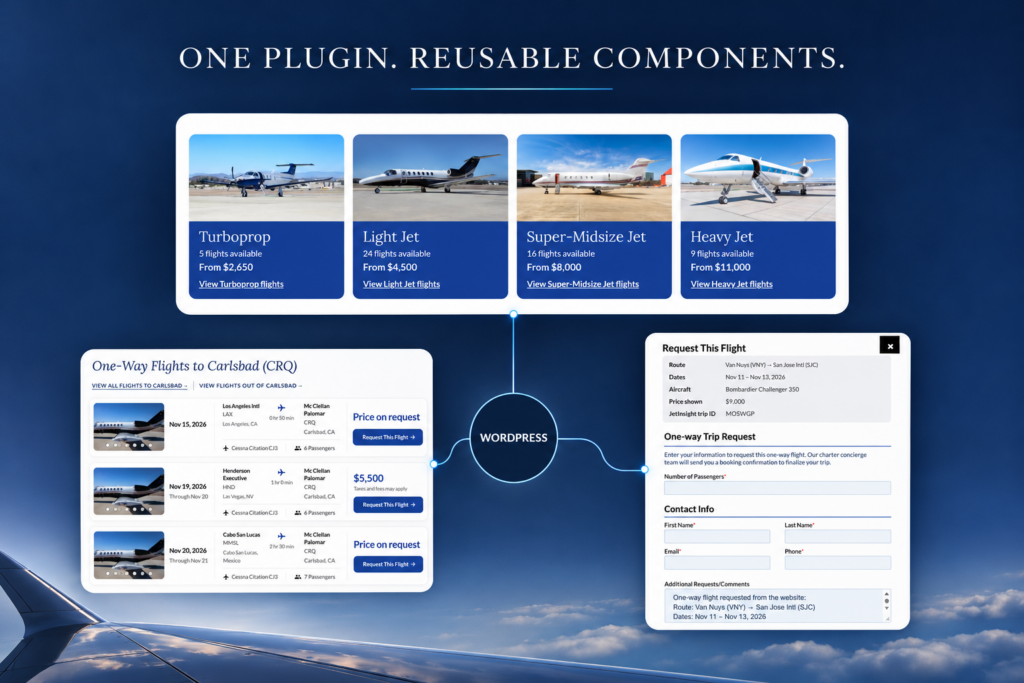
The custom WordPress plugin brings together data presentation, browsing controls, and reusable page integration. Aircraft filters, destination cards, and the flight feed provide different entry points into the same experience.
WordPress-managed content supports destination imagery and seasonal date settings. Shared components maintain consistency across the main listing and existing location pages.
I independently coded the plugin in VS Code, translating the client’s requirements into working features. Development began in late October 2026, with launch planned for November—approximately one month from start to target publication.
- PHP and WordPress for plugin functionality.
- JavaScript for interface behavior and seasonal image selection.
- Shortcodes for reuse within existing pages.
- URL parameters connecting HubSpot emails to prefilled inquiries.
DELIVERED CAPABILITIES
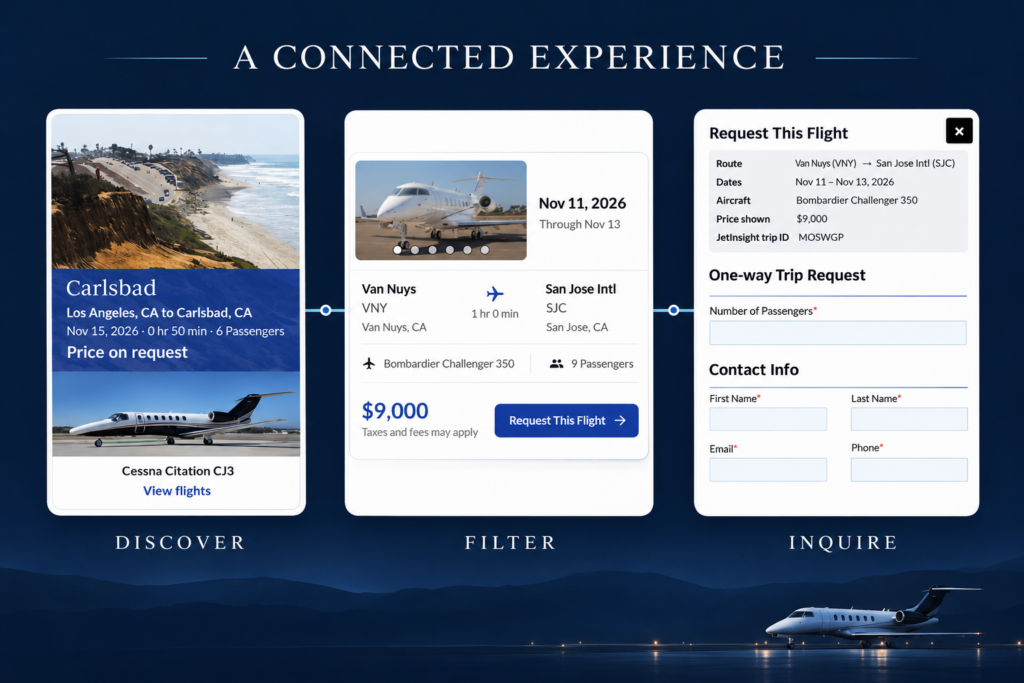
A connected flight-discovery experience.
The project brings several browsing paths into a reusable WordPress implementation. Visitors can approach flight availability through aircraft categories, destinations, or route details, while location pages share the same component.
Seasonal imagery gives editors control over presentation. The additional email-to-popup integration connects HubSpot destination links with prefilled flight inquiries.
- Multiple ways to discover the same flight opportunities.
- Reusable functionality across listing and location pages.
- Editable seasonal destination imagery.
- An inquiry enhancement beyond the original scope.
Let's build something useful.
Looking for someone who can connect front-end experience, WordPress development, and business integrations? Let’s talk about your project.